วันศุกร์ที่ 19 กุมภาพันธ์ พ.ศ. 2559

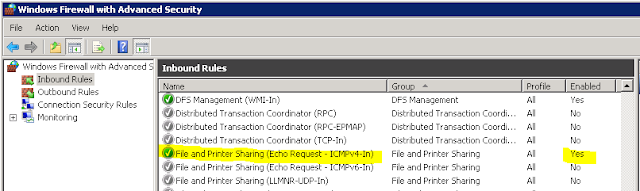
เปิดให้สามารถใช้คำสั่ง Ping ได้ใน Window Server 2008r2

1. เข้า Administrative Tools
2. เลือก Windows Firewall with Advanced Security
3. คลิกที่ Inbound Rules
4. หา File and Printer Sharing (Echo Request - ICMPv4-IN)
5. คลิกขวา Enable Rule


วันพฤหัสบดีที่ 11 กุมภาพันธ์ พ.ศ. 2559

วันพุธที่ 3 กุมภาพันธ์ พ.ศ. 2559

วิธีการเปิด Remote Desktop โดยไม่ต้องปิด Firewall สำหรับ Windows Server 2012 r2 , Win8.1


1. เข้าไปตั้งค่าใน Windows Firewall ให้ Allow App Remote Desktop
1.1 Control Panel --> Windows Firewall
1.2 คลิกลิงค์ Allow an app or feature thorough Windows Firewall ด้านซ้ายมือของหน้าต่าง Windows Firewall
1.3 เลือกหา Remote Assistance และ Remote Desktop ติ๊กถูกในช่อง Private และ Public


2. เปิด Run แล้วพิมพ์ในช่อง gpedit.msc แล้วกด OK
3. จะขึ้นหน้าต่าง Local Group Policy Editor
4. ให้เข้าไปที่  Computer Configuration > Administrative Templates > Windows Components > Remote Desktop Services > Remote Desktop Session Host.

5. ที่โฟลเดอร์ Security  คลิกเข้าไป แล้วเลือก "Require use of specific security layer for remote desktop (RDP) connection" เลือก Enable และ RDP ในช่อง Option แล้วกด OK 

6. ที่ "Require user authentication for remote connections by using Network Level Authentication"  เลือก Disable แล้วกด OK

7. ออกจากโปรแกรม แล้ว Restart เครื่อง

8. ทดสอบการ Remote โดยใช้เครื่องอื่น Remote เข้ามายังเครื่องที่ติดตั้ง Windows 8.1

Web Reference http://kb.mit.edu/confluence/display/istcontrib/Establishing+an+RDP+connection+with+a+Windows+8.1+client+from+Mac+OS+X

วันพฤหัสบดีที่ 24 ธันวาคม พ.ศ. 2558

แก้ปัญหา IPMI System Event.log และ Reset Sensor ใน Exsi 5.5

1. เปิด vCenter Server โดยใช้ vSphere Client.
2. เลือก Host ที่ขึ้น Alarm Event.log
3. คลิกที่แถบ Hardware Status.
4. ในช่อง View เลือก System Event log
5. คลิก Reset Event Log. แล้วรอจนกว่าจะทำงานเสร็จ
6. คลิก Reset Sensors เพื่อรีเซ็ตค่าเซ็นเซอร์ใหม่

วันศุกร์ที่ 11 ธันวาคม พ.ศ. 2558

How To Install Linux-Dash

1.Update system
# apt-get update

2.Install required packages
# apt-get install apache2 curl php5 php5-curl php5-json git

3.Change working directory to /var/www/html or your web directory

4. Download package
git clone https://github.com/afaqurk/linux-dash.git

5.Start apache service
# /etc/init.d/apache2 start

6. Open Browser and start linux-dash monitoring system
<IP_address>/linux-dash


Reference : http://www.unixmen.com/quick-install-linux-dash-linux/

วันอาทิตย์ที่ 8 พฤศจิกายน พ.ศ. 2558

วิธีปิดการทำงานของ Windows Defender ใน Windows 10


1. เข้าเมนู RUN โดยกดที่ปุ่มสัญญลักษณ์ Windows + R
2. พิมพ์คำว่า gpedit.msc
3. ขึ้นหน้าต่าง Local Group Policy Editor

4. ที่หัวข้อ Computer Configuration
เลือก Administrative Templates --> Windows Components --> Windows Defender
ดูเมนูทางด้านขวามือ ให้เลือกที่ Turn Off Windows Defender


5. ดับเบิลคลิกที่  Turn Off Windows Defender แล้วเลือก Disable หลังจากนั้นกด OK ออกมา
เสร็จสิ้นการปิด Windows Defender 

เว็บอ้างอิง : http://slashgenie.com/permanently-disable-windows-defender-in-windows-10/