วันพุธที่ 30 ตุลาคม พ.ศ. 2567

วิธี Backup Driver Windows 10-11 ผ่าน Command prompt

1. ไปสร้างโฟลเดอร์สำหรับเก็บไฟล์ Backup ไว้ที่ Drive D ด้วยชื่อ BackupDriverexport เช่น D:\BackupDriverexport 

2. เข้า cmd ด้วย สิทธ์ administrator 
3. พิมพ์คำสั่ง dism /online /export-driver /destination:"D:\BackupDriverexport" ดังตัวอย่าง

4. จากนั้น กด Enter รอทำงานจนเสร็จ แล้วปิดหน้าต่างนี้ไป


5. ไฟล์และโฟลเดอร์ที่ Backup

อ้างอิง : https://www.tenforums.com/tutorials/68426-backup-restore-device-drivers-windows-10-a.html


วันจันทร์ที่ 8 พฤษภาคม พ.ศ. 2566

แก้ปัญหา local group policy ใน Windows 11 ไม่มี

ถ้าใช้คำสั่ง gpedit.msc แล้วไม่ขึ้น ให้แก้ไขดังนี้ 

1.เปิด Notepad แล้วก๊อปข้อความ ข้างล่างนี้ไปวาง

  1. @echo off
  2. pushd "%~dp0"
  3.  
  4. dir /b %SystemRoot%\servicing\Packages\Microsoft-Windows-GroupPolicy-ClientExtensions-Package~3*.mum >List.txt
  5. dir /b %SystemRoot%\servicing\Packages\Microsoft-Windows-GroupPolicy-ClientTools-Package~3*.mum >>List.txt
  6.  
  7. for /f %%i in ('findstr /i . List.txt 2^>nul') do dism /online /norestart /add-package:"%SystemRoot%\servicing\Packages\%%i"
  8. pause

2.จากนั้น save ชื่ออะไรก็ได้ ให้นามสกุล .bat

3.เมื่อได้ไฟล์มาแล้ว ให้รันโดยการคลิกขวาที่ไฟล์ เลือก Run As Administrator

4. รอจนเสร็จ แล้วค่อยใช้คำสั่ง gpedit.msc อีกครั้ง

อ้างอิง : https://pastebin.com/AP5y7v5B , https://youtu.be/R3vzR9njBOw


วันจันทร์ที่ 31 ตุลาคม พ.ศ. 2565

วิธีข้ามขั้นตอนการ Login UserName ใน Windows 11 22H2

ในขั้นตอนการติดตั้ง  Windows 11 22H2 ,24H2 เมื่อมาถึงหน้านี้ และไม่มีข้อความ Sign-in options แล้ว ให้ทำวิธีต่อไปนี้

1. Shift + F10
2. oobe\bypassnro
3. ถ้าไม่ผ่าน ใช้คำสั่งใหม่ คือ start ms-cxh:localonly


1. ถอดสายแลน ออกก่อน หรือ Disconnect Network ทั้งหมด
2. กด Shift + F10 จะขึ้นหน้า Cmd


3. จากนั้นพิมพ์คำสั่ง oobe\bypassnro ต่อท้าย และกด Enter


4. จากนั้นเครื่องจะ Restart 1 ครั้ง และกลับมาสู่หน้าจอการติดตั้งอีกครั้ง 
5. ทำการติดตั้งไปถึงถึงหน้าการเชื่อมต่ออินเตอร์เน็ต ให้คลิกที่ i don't have internet
6. คลิก Connect with Limite Setup


7. จากนั้นทำตามขั้นตอนปกติได้เลย

web reference: https://pureinfotech.com/bypass-internet-connection-install-windows-11/


วันอังคารที่ 31 พฤษภาคม พ.ศ. 2565

การติดตั้ง Extension ใช้งาน IE11 ใน Microsoft Edge Windows 11

1.เปิด Microsoft Edge
2. กดที่จุด 3 จุด เลือก Extensions

3. ค้นหา IE Tab จากนั้นกด Get เพื่อติดตั้ง

4. กด Add Extensions


5. กดที่รูปจิ๊กซอร์ และกดที่รูปตา เพื่อให้แถบแสดง IE Tab จะเห็นรูปไอคอน e แสดงขึ้นมา

6. กดที่รูป e เว็บจะแสดงแถบอีก 1 แถบ สำหรับใช้งานกับเว็บที่ใช้ IE11 ให้ใส่ URL ที่ต้องการในช่องนี้

ส่วนใหญ่จะเป็นเว็บของทางราชการ ที่ไม่สามารถ หรือไม่รองรับกับ Browser รุ่นใหม่ๆได้


วันพฤหัสบดีที่ 25 พฤศจิกายน พ.ศ. 2564

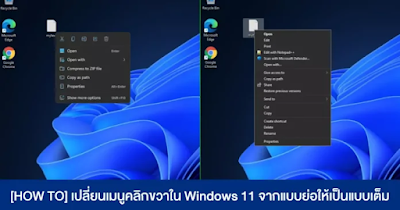
เปลี่ยนเมนูคลิกขวาใน Windows 11 จากแบบย่อให้เป็นแบบเต็ม


สำหรับใครที่ประสบปัญหาการคลิกขวาใน Windows 11 ที่มักจะทำให้เกิดความล่าช้าในกาทำงาน เนื่องจากมันไม่ยอมแสดงหน้าเมนูที่เราต้องการ วันนี้ผมมีวิธีปรับให้ Windows แสดงหน้าเมนูคลิกขวาแบบเต็ม ๆ แล้วครับ

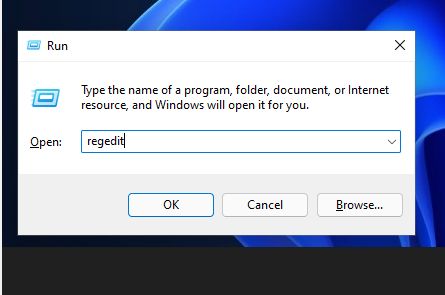
1.เริ่มแรกให้เปิด Run ขึ้นมาก่อน แล้วพิมพ์ regedit (หรือพิมพ์ลงในช่องค้นหาจากทาสก์บาร์ก็ได้)

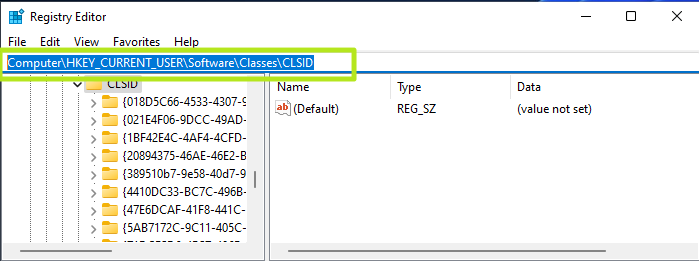
2.เปิดมาจะเป็นหน้าของ Registry Editor ให้เราเปิดไล่ทีละส่วน โดยไปที่ HKEY_CURRENT_USER > SOFTWARE > CLASSES > CLSID

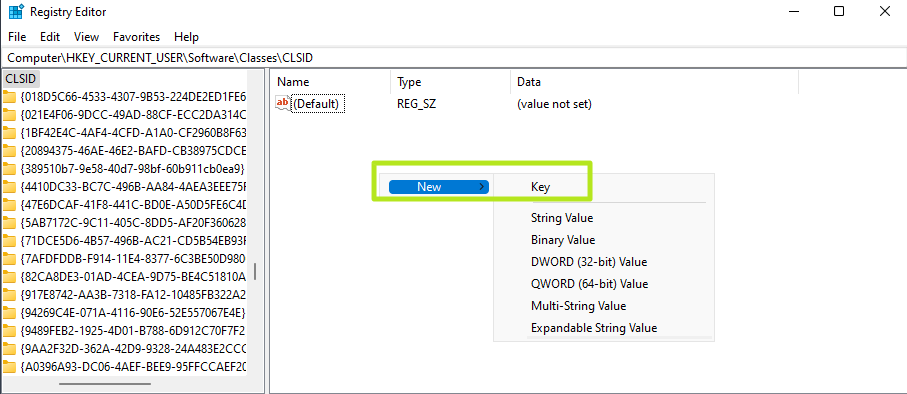
 3.ให้สร้างโฟลเดอร์ใหม่ขึ้นมาใน CLSID โดยเอาให้เราสร้างคีย์ขึ้นมาใหม่ (คลิกที่ CLSID 1 ทีก่อนนะ แล้วเข้าไปคลิกขวาตามภาพอีกที) ตั้งชื่อโฟลเดอร์ว่า {86ca1aa0-34aa-4e8b-a509-50c905bae2a2}

4.จากนั้น ให้คลิกขวาที่โฟลเดอร์ {86ca1aa0-34aa-4e8b-a509-50c905bae2a2} ที่สร้างขึ้นใหม่ แล้วเลือก New > Key ออกครั้ง สร้างโฟลเดอร์ย่อยที่มีชื่อว่า InprocServer32

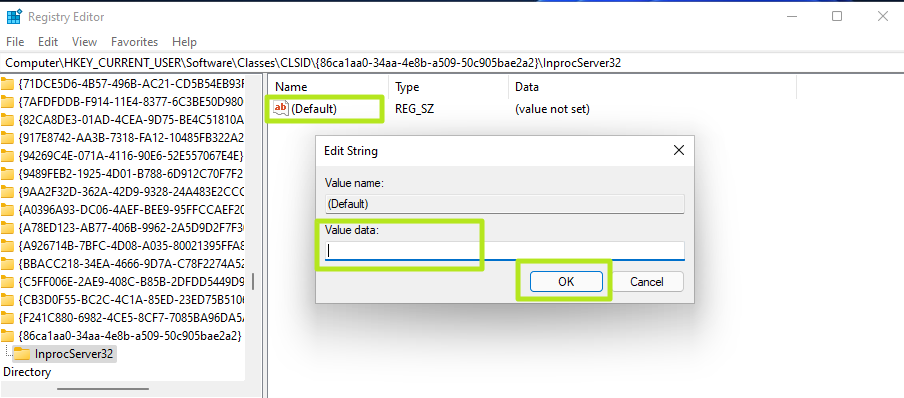
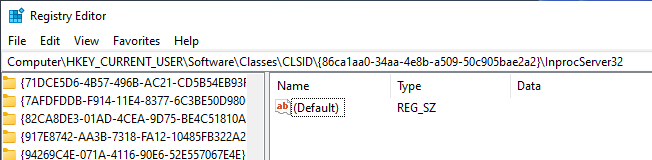
5.ในโฟลเดอร์ InprocServer32 ให้เราคลิกขวาที่ (Default) จากนั้นไม่ต้องใส่อะไร ให้กด OK ไปเลย (จะเห็นการเปลี่ยนแปลงคือ ค่าตรง Data จะเปลี่ยนจาก (value not set) เป็นค่าเปล่า ๆ)

6.กดปิด Registry Editor แล้วรีบูตเครื่องเท่านี้ก็เรียบร้อยครับ

ขอขอบคุณข้อมูลจาก Tom’s Hardware และ https://www.extremeit.com/how-to-windows-11-right-click/

วันพฤหัสบดีที่ 21 ตุลาคม พ.ศ. 2564

วิธีการการลบ Browser Microsoft Edge ออก (แก้ปัญหาเว็บราชการ)

 How to uninstall Microsoft Edge with Command Prompt 


You can forcibly uninstall Edge from Windows 10 through Command Prompt, using the commands we’ll provide below. But first, you'll need to find out exactly which version of Edge is installed on your PC.

1. Open Edge and click the three-line button in the top-right corner of the browser. Select “Help & feedback,” then “About Microsoft Edge.” 

Make a note of the version number below the browser name at the top of the page, or copy and paste it somewhere for reference.


(Image credit: Tom's Guide)


2. Next, open Command Prompt as an administrator. To do this, type "cmd" in the Windows search box and select “Run as administrator” next to Command Prompt at the top of the results list. 


(Image credit: Tom's Guide)

3. When Command Prompt opens, type (or copy and paste) the following command, but replace the “xxx” with the Edge version number from step 1, for example “92.0.902.62."

cd %PROGRAMFILES(X86)%\Microsoft\Edge\Application\xxx\Installer 

Press Enter and Command Prompt will switch to Edge’s Installer folder. Now type (or copy and paste) the following command:

setup.exe --uninstall --system-level --verbose-logging --force-uninstall

(Image credit: Tom's Guide)

4. Press Enter and Edge will instantly be uninstalled from Windows 10, without you needing to restart your PC. 

The browser's shortcut icon will disappear from your taskbar, though you may still see an Edge entry in the Start menu. However, this won’t do anything when clicked. 

reference :  https://www.tomsguide.com/how-to/how-to-uninstall-microsoft-edge